短信同意说明 · SMS Consent
Last updated: September 30, 2026
BAYLINK offers two separate SMS uses: verification codes that you request, and optional booking updates for service providers. Verifying a phone number does not subscribe you to booking updates. Neither program sends marketing or promotional messages.
When SMS messages are sent
- Phone verification is not required for general BAYLINK use. After signing in, you can choose to open Phone Verification in your profile.
- A one-time code is requested only after you enter your mobile number, read the notice beside the button, and select "Send verification code." Regular account registration does not automatically request a verification text.
- This verification program is for account security and phone verification, not marketing texts. Message frequency depends on your verification requests. Message and data rates may apply.
- 服务提供者可另外在预约短信设置中主动开启业务通知。手机验证不等于同意预约短信;当前预约短信仅发给已同意的服务提供者,不发给顾客。
- 预约短信只用于新申请、即时预约和顾客取消的相关通知,不是营销短信或定时到场提醒。预约状态与站内消息仍是查看处理结果的入口。
- See the STOP / HELP instructions below to opt out of texts or get help. If your code doesn't arrive or you have another question, contact Baylink.us@gmail.com.
- Enter verification codes only on a BAYLINK verification page you opened yourself. Do not send them to other users.
Phone verification messages
Verification codes are used only for account security and phone verification. BAYLINK does not send marketing or promotional SMS messages.
A verification SMS is sent only after the user actively requests a code. Message frequency varies based on verification requests. Msg & data rates may apply.
How users opt in to verification codes
Users opt in by completing the following steps inside BAYLINK:
Phone verification is optional for general BAYLINK use and is only used when a user chooses to verify their phone number for account security and community trust. BAYLINK does not send SMS during account registration unless the user separately opens Phone Verification, enters a mobile number, and clicks “发送验证码 / Send verification code”.
- Log in to BAYLINK.
- Open Profile and select Phone Verification.
- Enter their mobile phone number.
- Review the consent disclosure shown before sending a code.
- Click “Send verification code”.
- Receive a one-time verification code by SMS.
No verification SMS is sent until the user enters a mobile number and clicks “发送验证码 / Send verification code”. Verification consent is collected at that point inside the logged-in profile flow. The screenshots below show this verification flow, not consent to booking notifications.
Optional provider booking updates / 服务提供者预约短信
Service providers can separately enable booking SMS in their booking notification settings. This option requires a verified phone number and an available, configured SMS service. It is off unless the provider chooses to enable it. BAYLINK records the consent version, consent time, enabled preference and the verified number covered by that choice. Changing the verified number requires fresh consent. The number is not publicly displayed by verification or by enabling these notifications.
These texts notify the provider about new booking requests, instant bookings and cancellations by customers. They are not customer SMS, marketing messages, or scheduled appointment reminders. Frequency depends on booking activity. Message and data rates may apply. Booking changes are also recorded through BAYLINK booking records and in-site messages; turning SMS off does not disable bookings or in-site notifications.
服务提供者需在预约通知设置中单独开启短信;开启前须验证手机号,且短信服务已配置可用。系统保存同意版本、时间、开关状态及该次同意对应的已验证号码;更换号码后须重新同意。手机号不会因此公开。短信仅通知服务提供者新申请、即时预约与顾客取消,不发送给顾客,也不提供定时提醒。关闭短信仍可使用预约和站内通知。
A status of “SMS submitted” means the delivery service accepted the request, not that the phone received it. Failed or unavailable SMS does not cancel or remove a booking. Check the booking record and in-site messages for the current status.
「短信已提交」只表示短信服务接受了发送请求,不保证已送达。短信失败或暂不可用不会取消或丢失预约,请在站内查看当前状态。
Opt-out and help
You can turn off optional booking SMS in booking notification settings. For messages already received, follow the sender's STOP / HELP instructions. STOP suppression is handled by the SMS provider for that sender; it does not cancel a booking. Turning the BAYLINK setting on does not override a sender-level opt-out.
可在预约通知设置中关闭业务短信。对已收到的短信,可按发送方说明回复 STOP 退订或 HELP 求助;发送方的短信服务处理退订屏蔽。退订不会取消预约,重新打开站内开关也不会绕过发送方的退订状态。
For support, contact: Baylink.us@gmail.com
Privacy and terms
Phone Verification Opt-in Flow
The screenshots below illustrate the phone verification flow; the current interface may look different. A verification SMS is requested only after the user enters their mobile number, reviews the consent disclosure, and actively clicks “发送验证码 / Send verification code”.
Step 1: Log in to BAYLINK
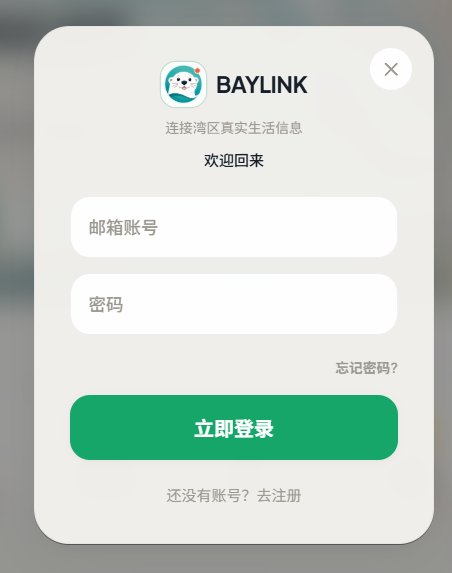
The user logs into their BAYLINK account from baylink.us.
Step 2: Open Profile → Phone Verification
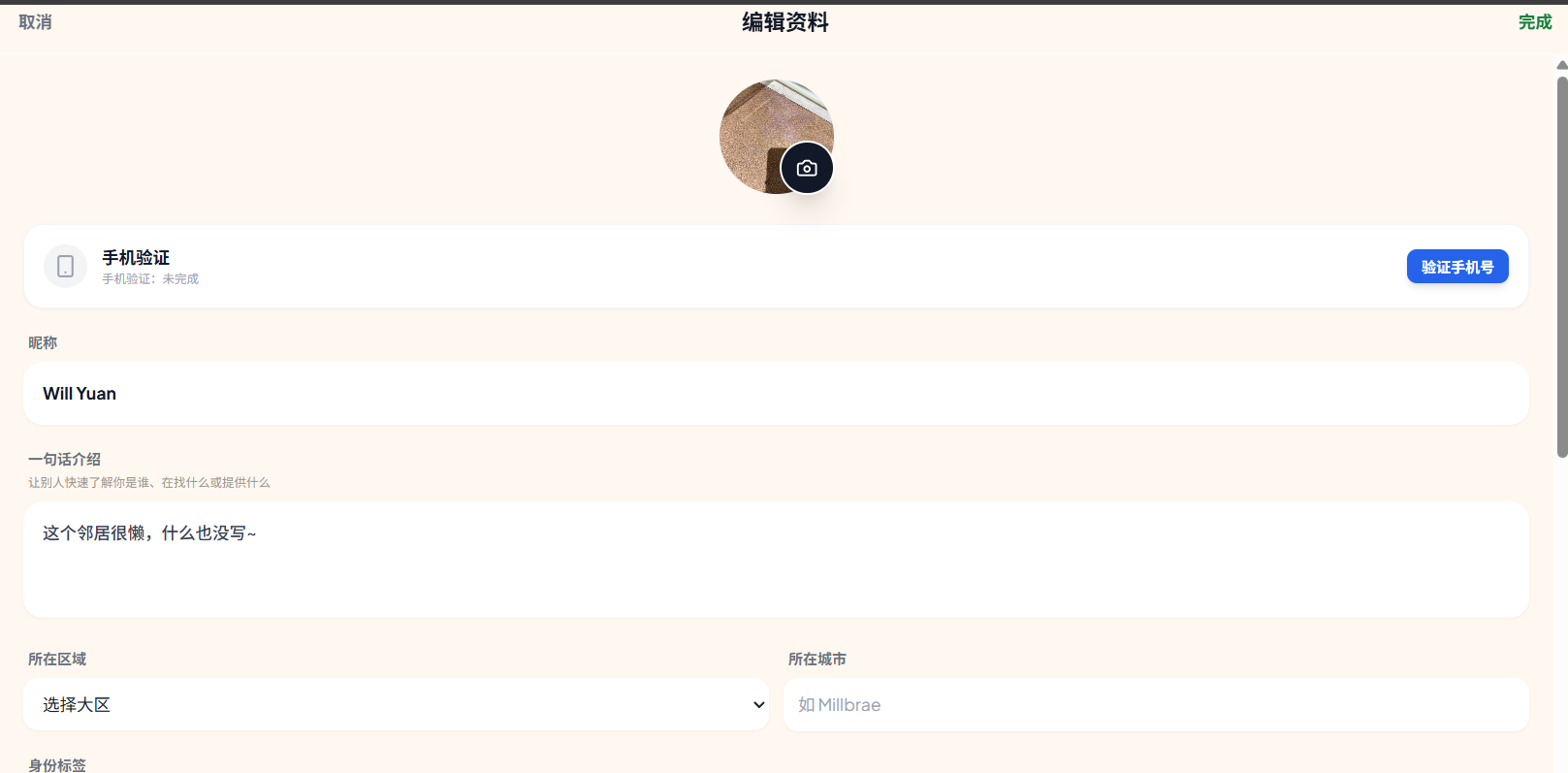
Inside the profile page, the user opens the phone verification section.
Step 3: Enter mobile number and review consent disclosure
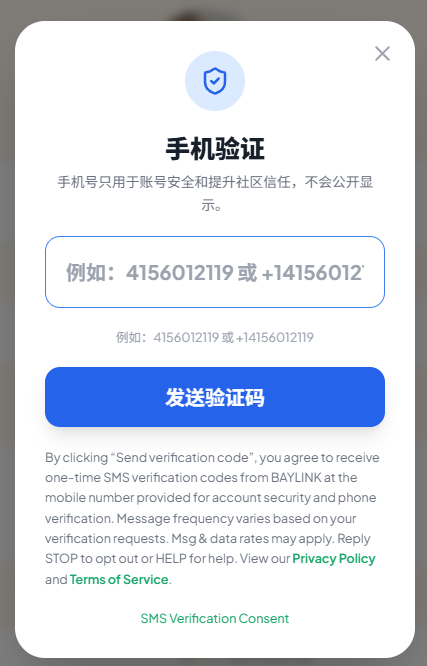
The user enters their mobile number and sees the SMS consent disclosure before requesting a code.
Step 4: Click “Send verification code”
BAYLINK sends the one-time verification code only after the user actively clicks the button.
Disclosure shown next to the phone verification CTA
By clicking “发送验证码 / Send verification code”, you agree to receive one-time SMS verification codes from BAYLINK at the mobile number provided for account security and phone verification. Message frequency varies based on your verification requests. Msg & data rates may apply. Reply STOP to opt out or HELP for help. View our Privacy Policy and Terms of Service.